
Optical Fiber Cable Distribution Box Buying Guide: How to Choose an ODB for FTTH Networks
An optical fiber cable distribution box should be selected by installation environment, fiber count, adapter type, splice and distribution layout, splitter requirement, cable routing space, protection grade, and maintenance access. In an FTTH or ODN project, the distribution box is the point where feeder cable, distribution fibers, adapters, splices, splitters, and drop cables become an organized access node. If the box is too small, poorly labeled, or unsuitable for the installation site, technicians may face difficult fiber management, higher fault risk, and slow subscriber activation. Buyers planning an access network should evaluate the ODB together with fiber optic cable products, fiber optic accessories, and the full FTTH route design.
Quick Answer
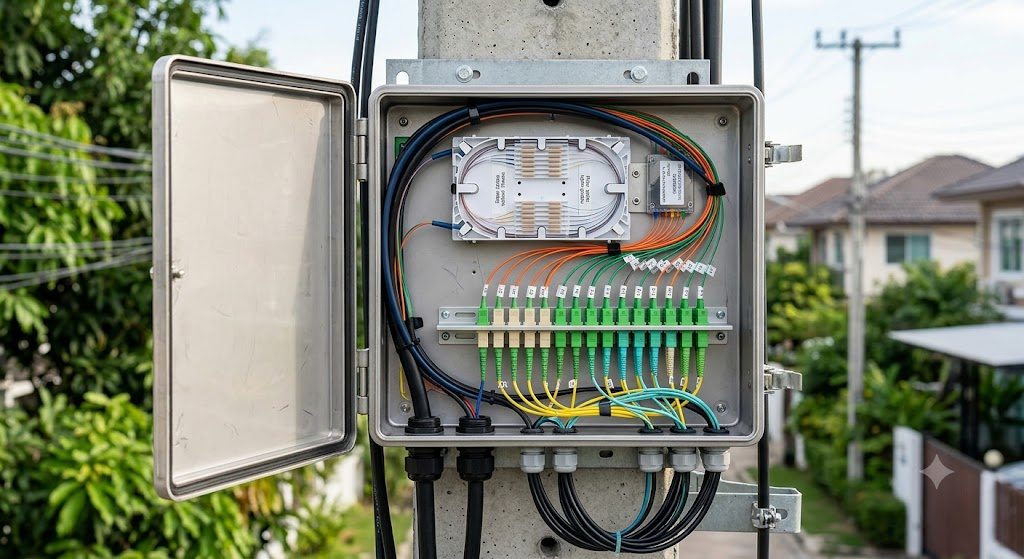
Choose an optical fiber cable distribution box by confirming whether the project needs an indoor or outdoor installation, whether the function is distribution type or splitter type, which adapters are required, how many fibers must be spliced and distributed, and how technicians will access the box for future maintenance. According to the FiberCableSupplier knowledge catalog, the optical fiber cable distribution box is mainly used as a user access point for FTTH-ODN networks. It can be divided into indoor and outdoor types by installation scenario, and into distribution type and splitter type by function.
The catalog also states that the internal structure layout is reasonable, with the fusion area and wiring area separated. The box can install SC, LC, and duplex LC adapters. It uses a modular wiring unit design for easier installation and maintenance, provides clear markings for each fiber core, stores excess fiber length by winding, and follows fiber routing specifications that meet the requirement of fiber bending radius greater than 30 mm.
Table of Contents
- What an Optical Fiber Cable Distribution Box Does
- Why ODB Selection Matters in FTTH Networks
- Distribution Type vs Splitter Type ODB
- Indoor vs Outdoor Installation
- Adapter and Connector Planning
- Fiber Routing, Splicing, and Storage
- Material, Protection Grade, and Mechanical Design
- Technical Selection Table
- Procurement Checklist
- Installation and Maintenance Tips
- Common Mistakes to Avoid
- Factory Insights
- Frequently Asked Questions
- Conclusion
What an Optical Fiber Cable Distribution Box Does
An optical fiber cable distribution box, often called an ODB, is a fiber management enclosure used at a distribution or access point in an optical network. It gives technicians a controlled place to splice fibers, mount adapters, route patching or drop fibers, protect excess fiber length, and identify each fiber core clearly. In an FTTH network, it often sits between feeder/distribution cable and subscriber-side drop cable.
The ODB is different from a simple junction box. It must handle optical performance, mechanical protection, labeling, and future maintenance at the same time. If the box does not have enough routing space, if the adapter layout is confusing, or if the splice and distribution areas are mixed together, a clean network plan can become difficult to maintain after only a few service changes.
For projects that combine outdoor feeder cable, splitters, drop cable, and customer access points, the ODB should be considered together with the full optical distribution network. FiberCableSupplier’s FTTH fiber optic cable guide and FTTH commercial broadband solutions page provide useful context for understanding where the distribution box fits in the access network.
Why ODB Selection Matters in FTTH Networks
ODB selection matters because FTTH networks are maintained over many years. A distribution box that looks acceptable during the first installation may become a bottleneck when subscribers are added, drop cables are changed, or fibers need troubleshooting. Good layout reduces technician time. Poor layout increases the chance of bending, mislabeling, connector contamination, and accidental disruption.
The catalog highlights several practical design points: separation between the fusion area and wiring area, support for SC, LC, and duplex LC adapters, modular wiring unit design, clear identification for each fiber core, winding storage for excess length, and fiber routing that maintains bending radius greater than 30 mm. These are not decorative details. They directly affect installation quality and maintenance speed.
In B2B procurement, the distribution box also affects the bill of materials. If the ODB is selected without considering splitters, adapters, drop cable, pigtails, patch cords, and cable entry direction, the installer may need extra accessories on site. That creates delays, inconsistent installation quality, and unnecessary cost. A better approach is to specify the ODB with the cable, adapter, splitter, and route requirements together.
Distribution Type vs Splitter Type ODB
The FiberCableSupplier catalog states that optical fiber cable distribution boxes can be divided by function into distribution type and splitter type. A distribution type ODB focuses on fiber termination, adapter mounting, splicing, and distribution management. A splitter type ODB includes or accommodates splitter functions for passive optical network distribution.
The correct choice depends on the network architecture. If the ODB is only used to organize incoming and outgoing fibers, a distribution type design may be enough. If the ODB is part of a PON distribution point where one feeder fiber is divided toward multiple subscribers, a splitter type design may be required. Buyers who are planning split ratios should coordinate the ODB with the PLC fiber optic splitter buying guide so the splitter package and box layout match.
| ODB Function | Main Purpose | Best-Fit Scenario |
|---|---|---|
| Distribution type | Fiber splicing, adapter mounting, routing, and subscriber distribution | Access points where fibers need organized termination and distribution without integrated splitting. |
| Splitter type | Fiber distribution plus passive optical splitting | FTTH/PON access points where feeder fiber is divided toward multiple users. |
Neither type should be chosen only by habit. The network designer should decide whether optical splitting happens inside the ODB, inside a cabinet, inside a splice closure, or elsewhere in the ODN. The wrong function choice can create a clean box with no room for the actual splitter, or an oversized splitter box where only simple distribution was needed.
Indoor vs Outdoor Installation
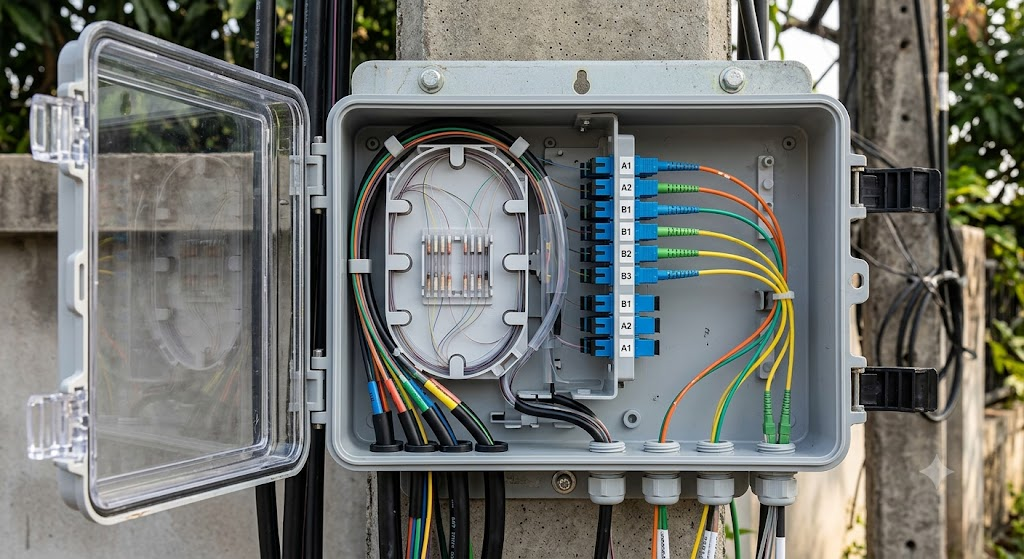
The catalog states that optical fiber cable distribution boxes can be divided into indoor and outdoor types according to installation scenario. It also states that sheet metal formed products are suitable for indoor wall mounting installation, while plastic injection molded products are suitable for indoor and outdoor pole and wall mounting.
This distinction is important because the box location changes the mechanical and environmental requirement. Indoor wall mounting usually emphasizes neat layout, accessible adapters, clear labeling, and compatibility with building cabling. Outdoor pole or wall mounting needs stronger attention to sealing, UV exposure, temperature, moisture, cable entry, and technician access in field conditions.
| Installation Scenario | Catalog-Backed Direction | Practical Buying Note |
|---|---|---|
| Indoor wall mounting | Sheet metal formed products are suitable for indoor wall mounting installation. | Confirm wall space, adapter direction, cable entry, and service access. |
| Indoor pole or wall mounting | Plastic injection molded products can be used for indoor pole and wall mounting. | Confirm mounting hardware and routing path. |
| Outdoor pole or wall mounting | Plastic injection molded products are suitable for indoor and outdoor pole and wall mounting. | Confirm protection grade, cable entry sealing, temperature, and maintenance access. |
For outdoor access nodes, ODB selection should also be coordinated with the outside cable route. If the network includes aerial cable, duct cable, or direct burial cable, the designer should consider how the ODB connects to feeder cable and drop cable. For broader outside plant planning, the outdoor fiber optic cable selection guide can help align cable construction with the distribution point.
Adapter and Connector Planning
The FiberCableSupplier catalog states that the ODB can install SC, LC, and duplex LC adapters. This is one of the most important selection points because adapter type affects port density, patching practice, connector compatibility, and future maintenance. SC is common in many FTTH and access network applications. LC is often selected where higher density or compact port layout is needed. Duplex LC may be used where paired fiber organization is required.
Before ordering, confirm the adapter type used by the project. Do not assume that the box can be adapted later without layout consequences. Adapter changes affect faceplate design, labeling, patch cord type, pigtail type, and technician workflow. If the network uses pre-terminated drop cables or patch cords, connector matching should be confirmed before the ODB is shipped.
Connector planning should also consider the rest of the access link. For example, an ODB may connect incoming outdoor cable to a splitter, then to drop cable or patch cord. FiberCableSupplier’s bow-type drop cable for duct and tight buffer fiber pages are useful examples of related fiber access components that may influence connector and routing choices.
Fiber Routing, Splicing, and Storage
The catalog describes an internal layout where the fusion area and wiring area are separated. This helps technicians manage splicing and distribution without mixing all fibers in the same working space. In practical terms, the fusion area is where fiber splices and splice protection are managed, while the wiring area is where adapter connections, patching, and outgoing distribution are organized.
The catalog also states that each fiber core should have clear markings for splicing and distribution, and that excess length is stored and protected by winding. These two points matter in every FTTH deployment. Clear labeling reduces mistakes during activation and troubleshooting. Proper winding storage reduces the risk of sharp bends, pinched fibers, and random fiber loops inside the box.
Fiber routing must maintain a bending radius greater than 30 mm, according to the catalog. Bend radius is a real optical performance issue, not only an installation preference. Tight bends can create attenuation and future reliability problems. Engineers may review general fiber recommendations such as ITU-T G.652 and ITU-T G.657 for fiber behavior context, but the final box layout should follow the product datasheet and project installation rules.
Material, Protection Grade, and Mechanical Design
The FiberCableSupplier catalog states that the product adopts high-strength engineering plastic injection molding or high-quality sheet metal molding. It notes good mechanical strength and a durable structure. The selection between plastic injection molding and sheet metal should be based on installation environment, mounting style, protection requirement, and project preference.
The catalog lists protection grades IP65 and IP53, atmospheric pressure of 70 kPa to 106 kPa, and category information for plastic injection molding and sheet metal molding. It also lists insulation resistance between the grounding device and box metal components of not less than 2 x 10⁴ MΩ at 500 V DC, and withstand voltage between the grounding device and metal components of not less than 3000 V DC for 1 minute.
For procurement, the important point is to confirm the exact model and category before using these values in a tender or quotation. Do not assume every ODB model has the same protection grade, material, or installation environment. The buyer should ask for the specific datasheet matching the selected box, port count, and installation type.
| Item | Catalog Information | Why It Matters |
|---|---|---|
| Internal layout | Fusion area and wiring area are separated. | Improves installation and maintenance organization. |
| Adapter support | SC, LC, and duplex LC adapters can be installed. | Helps match project connector requirements. |
| Fiber identification | Each fiber core has clear markings for splicing and distribution. | Reduces maintenance mistakes. |
| Excess fiber storage | Excess line length is stored and protected by winding. | Protects fiber slack and supports cleaner routing. |
| Bending radius | Fiber routing meets bending radius greater than 30 mm. | Protects optical performance and reliability. |
| Materials | High-strength engineering plastic injection molding or sheet metal molding. | Matches indoor/outdoor and wall/pole mounting needs. |
| Protection grade | Catalog lists IP65 and IP53 categories. | Must be matched to installation environment and exact model. |
Technical Selection Table
| Selection Item | What to Confirm | Practical Recommendation |
|---|---|---|
| Installation environment | Indoor wall, outdoor wall, indoor pole, outdoor pole | Select material and protection grade according to site conditions. |
| Function type | Distribution type or splitter type | Choose splitter type if optical splitting is required inside the box. |
| Adapter type | SC, LC, duplex LC | Match patch cords, pigtails, and customer-side connections. |
| Fiber count | Incoming cable, outgoing fibers, future spare capacity | Do not size only for today’s subscriber count. |
| Routing space | Bending radius, slack storage, tray access | Maintain fiber bending radius greater than 30 mm. |
| Material | Plastic injection molding or sheet metal molding | Match indoor/outdoor and mounting requirements. |
| Protection grade | IP65 or IP53 category where applicable | Confirm exact model before using in project documents. |
| Related components | PLC splitter, splice closure, drop cable, patch cord | Quote the ODB as part of the full access system. |
For standards context around fiber optic interconnection testing, project engineers may also review IEC references such as IEC 61300-3-15, while still using the actual ODB datasheet and project acceptance requirements as the controlling documents.
Procurement Checklist
- Confirm whether the ODB is for indoor or outdoor installation.
- Confirm wall-mounted or pole-mounted installation method.
- Choose distribution type or splitter type according to the ODN design.
- Confirm adapter type: SC, LC, or duplex LC.
- Confirm fiber count, splice count, adapter count, and future spare capacity.
- Confirm whether PLC splitters will be installed inside the box.
- Confirm cable entry direction and outgoing drop cable routing.
- Check fiber routing space and bending radius greater than 30 mm.
- Confirm material: high-strength engineering plastic or sheet metal.
- Confirm protection grade and temperature requirements for the exact model.
- Confirm labeling rules for each fiber core.
- Confirm related accessories such as pigtails, patch cords, splitters, and mounting hardware.
For B2B purchasing, the best inquiry includes installation environment, box function, adapter type, fiber count, splitter requirement, mounting method, and related cable types. Buyers can send those details through FiberCableSupplier’s contact page or review broader project support on the support page.
Installation and Maintenance Tips
First, install the ODB where technicians can access it safely. A distribution box may look compact and neat, but if the mounting height, cable entry direction, or working space is poor, every future subscriber activation becomes slower. Maintenance access should be planned before the box is installed.
Second, keep the fusion area and wiring area separated in actual field work. The catalog design supports separation, but technicians still need disciplined routing. Do not run patching fibers randomly through the splice area, and do not store excess drop cable where it blocks adapters.
Third, label every fiber clearly. The catalog highlights clear identification for each fiber core. In real projects, labels should match the network documentation, splitter ports, subscriber records, and test reports. Good labels save time during troubleshooting and expansion.
Fourth, protect bend radius. The ODB should not be filled beyond practical capacity. If the box is crowded, technicians may force fibers into tight bends. This can create optical loss and long-term reliability problems. The required bending radius greater than 30 mm should remain possible after all adapters, splitters, and fibers are installed.
Common Mistakes to Avoid
Mistake 1: Buying by Port Count Only
Port count is important, but it does not define the full box requirement. Buyers should also confirm adapter type, splitter function, fiber routing space, material, protection grade, and installation method.
Mistake 2: Choosing an Indoor Box for Outdoor Conditions
Indoor wall mounting and outdoor pole mounting create different requirements. Confirm material, protection grade, cable entry, and environmental conditions before ordering.
Mistake 3: Forgetting Splitter Space
If the ODB must hold a PLC splitter, that should be specified from the beginning. A distribution-only box may not provide the right layout for splitter installation and maintenance.
Mistake 4: Poor Labeling
Unclear labels make future troubleshooting slow and risky. Every fiber core, adapter, splitter output, and drop cable should be identified consistently.
Mistake 5: Overfilling the Box
An overfilled ODB increases bend risk, connector contamination, and maintenance difficulty. Leave enough room for slack storage, future work, and clean fiber routing.
Factory Insights
From a factory quotation perspective, an ODB inquiry is clearest when it includes installation environment, mounting method, function type, adapter type, port count, splitter requirement, material preference, and related cables. A request that only says “fiber distribution box” leaves too much room for mismatch.
The FiberCableSupplier catalog places the optical fiber cable distribution box in the fiber optic cable accessories section, near PLC optical splitters, splice closures, optical cable fittings, optical modules, patch cords, and pre-terminated waterproof connectors. This reflects how the product is used in real projects: the ODB is one part of a passive optical access system, not a standalone enclosure.
If the project includes outdoor cable, splice closures, splitters, and drop cable, the bill of materials should be reviewed as one system. FiberCableSupplier’s fiber optic splice closure buying guide and PLC fiber optic splitter buying guide can help buyers connect the ODB decision with the broader access network.
Frequently Asked Questions
What is an optical fiber cable distribution box?
An optical fiber cable distribution box is an enclosure used to manage fiber splicing, adapter mounting, fiber routing, fiber storage, and distribution at an access point in an optical network.
Where is an optical fiber cable distribution box used?
According to the FiberCableSupplier catalog, it is mainly used as a user access point for FTTH-ODN networks.
What adapter types can the ODB support?
The catalog states that the ODB can install SC, LC, and duplex LC adapters.
What is the difference between distribution type and splitter type?
A distribution type ODB is mainly for fiber termination and distribution. A splitter type ODB is selected when the box also needs to support optical splitting in the FTTH or PON network.
Can the ODB be used outdoors?
The catalog states that plastic injection molded products are suitable for indoor and outdoor pole and wall mounting. Buyers should confirm the exact model and protection grade for the installation site.
Why is bending radius important inside the ODB?
The catalog states that fiber routing should meet the requirement of fiber bending radius greater than 30 mm. This helps protect optical performance and long-term reliability.
What material options are listed for the ODB?
The catalog lists high-strength engineering plastic injection molding and high-quality sheet metal molding.
What information should I provide for an ODB quotation?
Provide installation environment, mounting method, function type, adapter type, fiber count, splitter requirement, protection grade requirement, cable entry direction, and related accessories.
Conclusion
An optical fiber cable distribution box should be selected as part of the FTTH-ODN design, not as a generic enclosure. The right ODB depends on installation environment, distribution or splitter function, adapter type, fiber count, cable routing, bending radius, material, protection grade, labeling, and future maintenance access. A well-planned ODB makes installation cleaner and long-term service work faster.
FiberCableSupplier’s catalog-backed ODB information includes indoor and outdoor installation categories, distribution and splitter function types, support for SC, LC, and duplex LC adapters, separated fusion and wiring areas, clear fiber core identification, winding storage for excess fiber length, high-strength engineering plastic or sheet metal construction, and fiber routing that supports bending radius greater than 30 mm.
Need help choosing the right fiber optic cable?
Our engineering team can recommend the best solution for your project. Contact us today for a free quotation.


